
WARDOGS Cheats for Player ESP, Aimbot and Vehicle ESP
One license covers aim, player and vehicle visuals, 2D radar and weapon modules on Windows. Check live status before you launch after a patch.
Product Overview
At a glance
Key capabilities
What WARDOGS Hacks focuses on before you open the full module list.
Plus 14 additional modules in the operator portal. See the full list below.
Overview
One license for WARDOGS on Windows
How modules, presets, and patch-day status checks fit WARDOGS match workflows.
WARDOGS Hacks bundles aimbot, player ESP, vehicle ESP, 2D radar, and weapon modules for large-scale control-zone matches. Loader tabs group aim, visuals, radar, and misc options so you can enable awareness tools separately from combat assists.
Licenses cover Windows 10 and 11 on Intel or AMD. Plans at checkout are 1 Week (7 days), 1 Month (30 days), and Lifetime. Confirm online status on getwardogshacks.com before you buy or launch.
This license covers WARDOGS on Windows with player ESP, vehicle ESP, aimbot, 2D radar, and weapon modules such as no recoil and no spread. AWS and Cloud DMA are separate options when your build lists them.
Tune before you queue
Load portal presets offline first, then adjust aim FOV, smoothing, and ESP distance over several sessions. Support can help with loader tabs if a module conflicts after a game update.
Plans and delivery
Choose 1 Week ($15 for 7 days), 1 Month ($35 for 30 days), or Lifetime ($150) at checkout. The operator portal unlocks instantly with loader download, preset library and patch notes. Check the live status banner before every session.
Module layout
Aimbot, player ESP, vehicle ESP, radar, and weapon options each have their own loader tab so you can disable combat assists while keeping awareness modules enabled.
Modules
What's included
Every module and overlay shipped with WARDOGS Hacks, toggle and tune in the operator portal.
- Enable Aimbot
- Aim FOV, smoothing and bone selection
- Visible check and prediction
- Draw FOV and draw target line
- Player boxes, skeleton and head circle
- Health bar, distance, name and team labels
- Weapon and view direction markers
- OOF arrows and max distance
- Vehicle ESP with type and distance
- Occupied or empty vehicle state
- 2D radar with player and vehicle markers
- Radar range control
- No recoil and no spread toggles
- Full bright and custom crosshair
- Config save and load
- Stream-proof overlays
- AWS option (separate)
- Cloud DMA option (separate)
- Windows 10/11; Intel/AMD
- Instant delivery via operator portal
Experience
Loader layers · After checkout
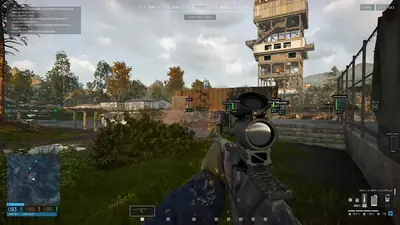
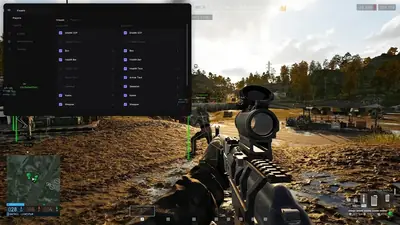
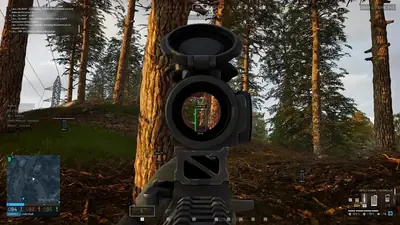
Use the screenshots above for ESP layout; below is what each loader layer does and how portal access works after purchase.
In-game layers
- Layer A
Player ESP in the control zone
Green bounding boxes, name tags, and meter labels on enemy players near Hesco barriers and metal towers.
- Layer B
Visuals menu and ESP toggles
Side panel with checkboxes for box ESP, skeleton, health text, armor text, name, and weapon callouts.
- Layer C
Scoped ESP in woodland
Magnified optic framing a fallen operator while a green player box and distance tag mark the target in tall grass.
More products
Pairs well with
Other tools from the same store, each with its own page and checkout.
- HWID Spoofer From $35 Changes disk serials, MAC addresses, GPU IDs and related identifiers after a hardware ban. Cleaner included. View details
- UGC From $35 Unban & Governance Control: custom appeal workflows and dispute automation for restricted accounts on any platform. View details
- Skin Changer From $35 Lightweight tool that unlocks premium weapon skins, character outfits and rare knife variants across major titles. View details
FAQ
Questions about this page
Answers tied to what you are reading. Visit the FAQ page for every topic.
Blog
Related guides
Filter by topic to find setup guides, feature deep-dives, and patch-day notes.
Buying a cheat should not feel like guesswork. Here is the exact order of steps from checking status to your first launch, plus what to do if you switch PCs.
WARDOGS is a big, messy, three team shooter, and not every cheat package suits it. This guide covers the features and the practical details worth checking before you pay.
ESP is only useful if you can read it. This guide explains the common WARDOGS ESP options and how to configure a clean setup for three team, 100 player matches.
Most aimbot problems come from settings that are too aggressive. These starting points suit WARDOGS' long sight lines and mixed range fights.
Searching for free WARDOGS hacks usually ends in a download you cannot trust. This comparison covers what you give up when you do not pay.
Most WARDOGS anti-cheat errors come from software conflicts or a damaged EAC install. This checklist goes from the simplest fix to the more involved ones.
WARDOGS community forum
Read discussion
Archived, read-only threads on loader setup, ESP modules, patch status, and HWID bans. Replies are closed.
- General Discussion Is WARDOGS Hacks worth researching, or should I stick with vanilla? A discussion about third-party game software, what information to check before considering it, and whether the risks outweigh the appeal.
- Technical Support WARDOGS software compatibility: what should I check before installing anything? A checklist-oriented discussion about checking software requirements, supported operating systems, security concerns, and official game policies.
- Technical Support WARDOGS update broke something? How do you troubleshoot after a patch? A practical troubleshooting discussion for unexpected crashes, performance changes, or other issues after a WARDOGS patch.
- Technical Support WARDOGS crashes on startup: what information should I include in a support ticket? A discussion about collecting useful troubleshooting details before contacting support about WARDOGS startup crashes.